
Search South Carolina LLC, Corporation & Business Records
South Carolina’s Secretary of State provides a public Business Entities Online system for corporations, nonprofit corporations, LLCs, limited partnerships and limited liability partnerships. The same system also connects users with registered-agent searches, document requests and entity filings.
For a normal lookup, search the business name first, open the official profile and verify the entity type, status and registered-agent information before ordering documents or submitting a filing.
Fastest search: enter the strongest distinctive part of the legal business name. South Carolina’s current search returns entities containing the search criteria.
Registered-agent lookup: use the separate agent-search page when the agent’s name is your strongest clue. The public system can show entities served by that registered agent.
Important status meaning: the state’s Business Entities Online disclaimer says “Good Standing” means the entity has not been dissolved in the Secretary of State’s records. It does not mean the company is necessarily operating, licensed, financially sound or trustworthy.
How to Search a South Carolina Business by Name
The public name search is simple, but you get better results by starting with fewer words and opening every close match that could be the entity you need.
- Open the official South Carolina Business Name Search.
- Enter the business name or the strongest distinctive part of it.
- Complete the CAPTCHA when the portal requests it.
- Review all close matches in the result list.
- Open the matching entity to view its official business profile.
- Confirm the legal name, entity type, status, registered agent and registered office.
- Use Add Filing or document-request services only after you have confirmed the correct profile.
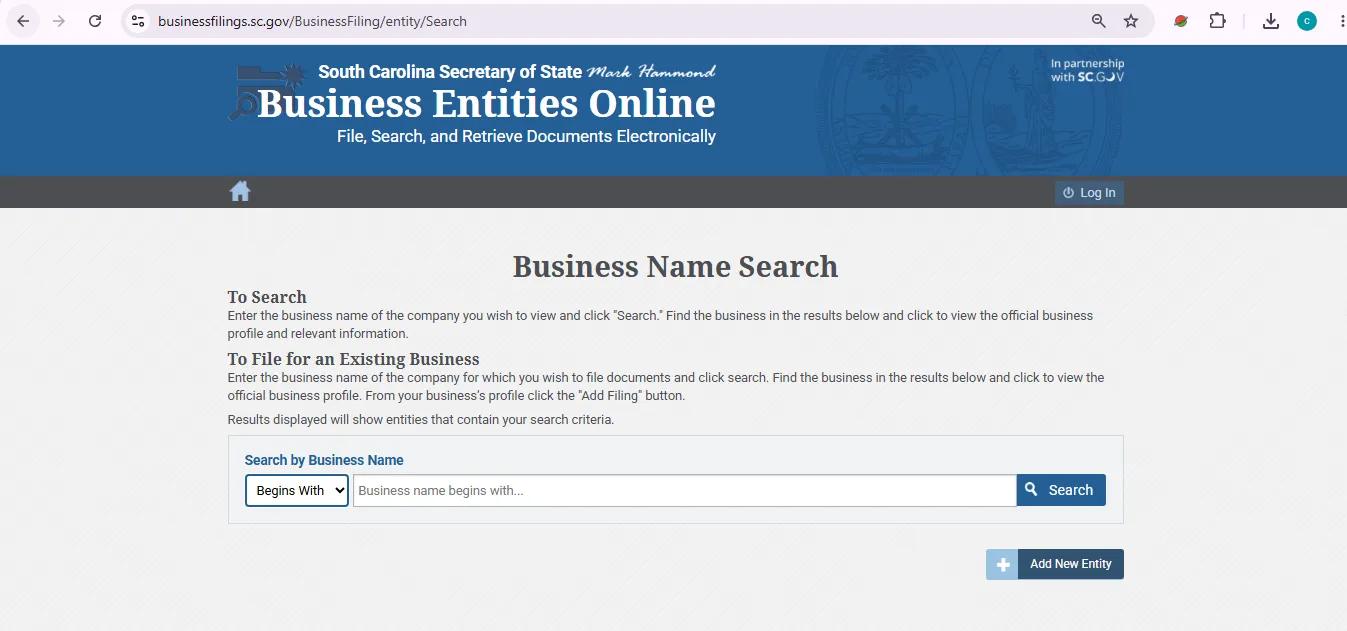
This visual is provided only to help users recognize the official search area. It is not presented as proof that this informational website is an official South Carolina government website.
Search South Carolina Businesses by Registered Agent
South Carolina provides a separate public Registered Agent Search. This can be useful when you know the agent but not the exact business name, or when you want to identify entities served by the same agent.
Open the official Registered Agent Search.
- Enter the full or partial registered-agent name.
- Run the search.
- Review the returned businesses rather than assuming every result is related.
- Open the relevant business profile to confirm status and registered office information.
What to Check on the South Carolina Entity Profile
Confirm the entity
- Exact legal business name
- Entity type
- Current status shown by the SOS system
- State or jurisdiction information where shown
- Formation or filing information available in the profile
Review public filing details
- Registered agent
- Registered office address
- Available corporate filings
- Amendments, dissolutions or other filed documents
- Document-request options
What “Good Standing” Means in South Carolina SOS Records
The current Business Entities Online disclaimer gives “Good Standing” a narrower meaning than many users assume.
What it means
The business entity has not been dissolved in the records of the South Carolina Secretary of State.
What it does not prove
It does not prove that the business is currently operating, professionally licensed, insured, tax-compliant, reputable or financially healthy.
South Carolina Business Name Search & Reservation
Use Business Name Search as a screening step before filing, but do not assume one clear search guarantees that the filing office will accept the proposed name.
Search before filing
- Search the full proposed name.
- Search the strongest distinctive words.
- Try singular and plural versions.
- Search without LLC, Inc. or Corporation.
- Open close matches before deciding the name is clear.
Name reservation rules
Corporation reservation: $10.
LLC reservation: $25.
Both reservation types can hold a name for a nonrenewable 120-day period.
South Carolina Annual Reports: LLCs vs. Corporations
South Carolina’s recurring reporting system is different from states where every LLC and corporation files the same annual report with the Secretary of State.
| Entity | Reporting rule | Where handled | Important detail |
|---|---|---|---|
| Standard LLC | No general recurring annual report is listed with the Secretary of State for a standard LLC. | Tax filing depends on the LLC’s tax classification. | An LLC taxed as a corporation has South Carolina corporate tax/reporting obligations with SCDOR. |
| Domestic corporation | Initial Annual Report of Corporations, Form CL-1, is required. | Filed with formation through the Secretary of State; ongoing corporate reporting is tied to SCDOR tax filings. | The CL-1 carries a $25 minimum license fee. |
| C Corporation | SC1120 is filed annually and contains Schedule D, the annual report. | South Carolina Department of Revenue. | Generally due by the 15th day of the fourth month after the end of the business year. |
| S Corporation | SC1120S and annual license-fee obligations apply. | South Carolina Department of Revenue. | Calendar-year S corporations generally file by March 15. |
Certificates of Existence & Corporate Document Copies
Business Entities Online can provide certificates and copies after you identify the correct entity.
| Request | Current listed price | When to use it |
|---|---|---|
| Certificate of Existence / Authority | $10 | Formal proof commonly requested by banks, lenders, vendors or another state’s filing office. |
| Certificate of No Record / Certificate Under Seal | $20 | Use only when this specific certificate is requested. |
| Document copy — first page | $3 | Ordering a copy of a filed corporate document. |
| Each additional page | $0.50 | Added for multi-page document requests. |
Open the official Document Request page.
- Search and open the correct business profile.
- Confirm the legal name and entity status.
- Ask the recipient whether it needs a Certificate of Existence, a specific filed document or another certificate.
- Use the official Business Entities Online request process.
- Review the final online service charge before paying.
Common South Carolina Business Entity Fees
| Service | Current listed fee | Practical note |
|---|---|---|
| Business entity search | Free | Public business-name lookup. |
| Registered-agent search | Free | Search full or partial agent name. |
| Domestic LLC Articles of Organization | $110 | Forms a South Carolina LLC. |
| Foreign LLC Certificate of Authority application | $110 | Registers an out-of-state LLC to transact business in South Carolina. |
| Domestic business corporation formation | $135 total | $110 corporate filing amount plus the $25 CL-1 minimum license fee. |
| Corporate name reservation | $10 | Nonrenewable 120-day reservation. |
| LLC name reservation | $25 | Nonrenewable 120-day reservation. |
| Registered agent / office change | $10 base filing fee | Online service charges may be added at checkout. |
| Certificate of Existence | $10 | Order directly from the Secretary of State. |
Review current South Carolina business forms and listed fees.
New 2026 SC.GOV Identity Verification for Online Filings
Effective September 10, 2026, South Carolina changed the login process for applicable Business Entities Online filing services.
Public search
You can still use the public business and registered-agent search tools for lookup without treating them as an account-based filing.
Account-based filing
Business Entities Online now uses an SC.GOV account plus identity verification for applicable online filing services. Old Business Entities Online usernames and passwords no longer work as the filing login.
- Open Business Entities Online.
- Sign in with SC.GOV or create an SC.GOV account.
- If you had an older Business Entities Online account, use the same email address to keep existing filings connected where applicable.
- Complete the required identity-verification step.
- Have a current photo ID and phone available in case the verification service requests an ID photo.
If a South Carolina Business Was Administratively Dissolved
Do not automatically form a replacement entity when an older business shows an administrative dissolution. The Secretary of State provides reinstatement routes for eligible entities.
Business corporation
A business corporation may apply for reinstatement after administrative dissolution without the two-year limit that applies to some other entity types.
LLC or nonprofit
The Secretary of State’s current FAQ says LLCs and nonprofit corporations must apply for reinstatement within two years of administrative dissolution.
Two Things You Will Not Find in the SOS Database
South Carolina DBA / trade-name registration
The Secretary of State says it does not register DBA or trade names. A business may therefore use a trade name that is not a separate searchable SOS entity record.
Complete officer, director or owner lists
The Secretary of State says entities are not required to disclose directors, officers or members to its office. Corporations submit director information through annual reporting handled by SCDOR, while stockholder information is maintained by the corporation itself.
Common South Carolina Business Search Problems
| Problem | Best next step |
|---|---|
| No business appears | Remove LLC, Inc., Corporation and punctuation, then search the strongest distinctive words. |
| Many similar names appear | Open each close result and compare status, entity type, registered agent and registered office. |
| You only know the registered agent | Use the separate Registered Agent Search rather than guessing the business name. |
| Need officer or director names | The SOS does not maintain complete officer/director lists; use applicable SCDOR corporate records or other authoritative records. |
| Need a DBA record | Do not expect a statewide SOS DBA registry; South Carolina SOS does not register DBA or trade names. |
| Certificate solicitation asks for a large payment | Compare it with the official $10 Certificate of Existence service before paying. |
| Old portal login no longer works | Use the new SC.GOV sign-in and complete identity verification for applicable filing services. |
South Carolina Secretary of State Business Filings Contact
Business Filings
Phone: 803-734-2158
Use this number for corporate entity filing and Business Entities Online questions.
Office address
South Carolina Secretary of State
1205 Pendleton Street
Suite 525
Columbia, SC 29201
Office hours
Monday–Friday
8:30 a.m.–5:00 p.m.
Check the official site for state-holiday closures before visiting.
Open the official South Carolina Secretary of State office directory.
Official South Carolina Business Entity Resources
Search businesses on file with the South Carolina Secretary of State and open official entity profiles.
Search full or partial registered-agent names and view entities served by an agent.
Start new filings, search existing entities, request documents and access current login instructions.
Order Certificates of Existence, Certificates of Authority and copies of filed corporate documents.
Current formation forms, foreign-registration forms and listed filing charges.
Official guidance on DBAs, officers, reinstatement, foreign entities, name reservations and common filing rejections.
CL-1, corporate annual tax returns, LLC tax classifications and corporate filing deadlines.
Official warnings about deceptive business-service solicitations and inflated certificate fees.
South Carolina Business Entity Search FAQ
1. Is the South Carolina business entity search free?
Yes. The Secretary of State provides a free public Business Name Search and a separate free Registered Agent Search. Fees apply when you file documents or order certificates and copies.
2. Where do I search for a South Carolina LLC or corporation?
Use the South Carolina Secretary of State Business Entities Online Business Name Search. Enter the business name, review matching results and open the official business profile.
3. Can I search South Carolina businesses by registered agent?
Yes. South Carolina has a separate Registered Agent Search that accepts a full or partial agent name. The first 50 results are displayed; the state advises contacting the office when a query produces more than 50 results.
4. What does Good Standing mean in the South Carolina SOS database?
It means the entity has not been dissolved in the Secretary of State’s records. The state expressly says this does not necessarily mean the business is currently operating.
5. Does the South Carolina Secretary of State show officers, directors or owners?
Not as a complete ownership or management directory. The SOS says entities are not required to disclose directors, officers or members to its office. Business corporations submit director information through reporting handled by SCDOR.
6. Do South Carolina LLCs file an annual report with the Secretary of State?
A standard South Carolina LLC does not have a general recurring Secretary of State annual report. Tax filing obligations depend on the LLC’s tax classification, and an LLC taxed as a corporation has SCDOR corporate filing requirements.
7. What annual reporting does a South Carolina corporation have?
A corporation files the initial CL-1 report and minimum $25 license fee with formation or qualification. Ongoing corporate annual reporting is tied to the corporation’s SCDOR tax return; for a C corporation, Schedule D of SC1120 is the annual report.
8. How much is a South Carolina Certificate of Existence?
The Secretary of State currently charges $10 for a Certificate of Existence or Certificate of Authority. The office warns businesses not to pay inflated third-party solicitation prices for the same type of document.
9. Does the South Carolina Secretary of State register DBA or trade names?
No. The Secretary of State’s current business-entity FAQ says the office does not register DBA or trade names.
10. What can I do if a South Carolina entity was administratively dissolved?
Eligible entities may apply for reinstatement. Business corporations may reinstate after administrative dissolution, while the current SOS FAQ says LLCs and nonprofits must seek reinstatement within two years. A DOR tax-compliance certificate may be required when the dissolution resulted from tax-filing deficiencies.