
Search North Carolina LLC, Corporation & Business Records
The North Carolina Secretary of State Business Registration database lets you search registered businesses, review SOSID numbers, status, registered agents, company officials and public filings.
The safest workflow is to search broadly, open the correct profile and save the SOSID before filing an annual report, ordering certified documents or changing the business record.
Fast answer: use the official North Carolina Secretary of State Business Registration search. Start with the organization’s distinctive name words, then open the matching profile to confirm its SOSID, status, registered agent and filing history.
Exact-record shortcut: if you already know the SOSID, use it. SOSID is the state’s key identifier for a North Carolina business-registration record.
Do not confuse registration with licensing: an NC SOS business record does not automatically prove a professional license, tax account, insurance coverage, local permit or regulatory approval.
How to Search North Carolina Business Records
The NC SOS search is more reliable when you begin with the core business name and add details only if the result list is too large.
- Open the North Carolina Business Registration search.
- Select the type of record or person you want to search.
- Enter the organization name or available person-name information.
- Start with the most distinctive words instead of the full marketing or logo name.
- Open the matching business profile.
- Save the SOSID and check status, registered agent, officials and filings.
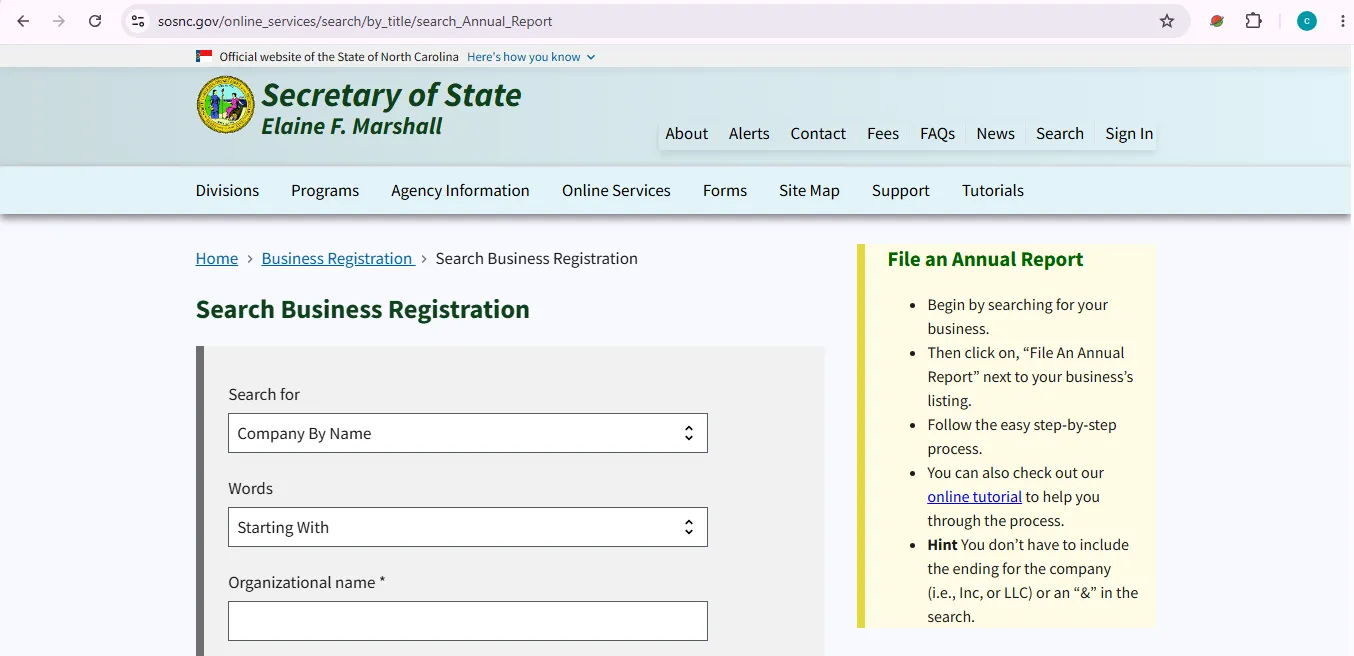
Image description: this visual helps users identify the official NC SOS business-search area where organizational names, person information and related search criteria can be entered. It is provided as a navigation aid and is not a claim that this website is an official government website.
Useful North Carolina Business Search Options
| Search clue | When to use it | Best practice |
|---|---|---|
| Organizational name | You know the legal business name or part of it. | Search the distinctive words first and avoid unnecessary suffixes. |
| SOSID | You already have the exact North Carolina entity identifier. | Use this for annual reports, certified-document orders and support questions. |
| Person name | You know an official, member, manager, officer or other person connected with the entity. | Use last, first and middle-name fields as needed and compare each result carefully. |
| Registered agent | The registered agent is your strongest identifying clue. | Remember that one commercial agent can serve many unrelated companies. |
What to Check on a North Carolina Business Profile
Entity identity
- Exact legal name
- SOSID
- Entity type
- Current status
- Formation or registration information
- Prior names when shown
Contacts and filings
- Registered agent
- Registered office
- Principal and mailing addresses where available
- Company officials
- Annual reports
- Formation documents and amendments
Verification habit: save the legal name, SOSID, status, registered agent and date of your search before ordering a certificate or relying on the record for a transaction.
North Carolina Business Name Search & Reservation
A database search is a useful first screen for a proposed LLC or corporation name, but search results do not guarantee that the Secretary of State will accept a filing.
- Search the exact proposed name.
- Search the strongest distinctive words separately.
- Search without LLC, Inc., Corporation and punctuation.
- Open close matches and compare entity type and status.
- Check the official entity-specific fee before reserving the name.
North Carolina Annual Report Deadlines & Fees
Annual-report rules depend on entity type. LLCs use a fixed April 15 deadline, while business corporations and LLPs generally use a fiscal-year calculation.
| Entity type | Due date | Paper filing | Typical online total |
|---|---|---|---|
| Business corporation / bank | 15th day of the 4th month after fiscal year end | $25 | $21 by credit card; ACH uses a $2 electronic fee instead of the $3 card fee |
| LLC / L3C | April 15 each year after the year of creation | $200 | $203 by credit card; ACH uses a $2 electronic fee instead of the $3 card fee |
| LLP / LLLP | 15th day of the 4th month after fiscal year end | $200 | $203 by credit card; ACH uses a $2 electronic fee instead of the $3 card fee |
| Cooperative association with common stock | Before March 1 | $10 | Paper filing only under current guidance |
Open official annual-report due dates.
- Search for the business first.
- Confirm the legal name and SOSID.
- Use the File an Annual Report action associated with the correct business.
- Review existing company information and update required fields.
- Confirm the entity type and fee before submitting payment.
Certificate of Existence & Certified Documents
A free business search is enough for routine lookup. Formal certificates and certified copies are for banks, lenders, contracts, courts, licensing bodies and other situations where a normal profile page is not accepted.
The current NC SOS Business Registration fee schedule lists a Certificate of Existence or Certificate of Authorization at $15 for business corporations and LLCs. The online ordering system should be treated as the final current price source before payment.
Open NC SOS Order Certified Documents guidance.
- Create or sign in to an NC Secretary of State online account.
- Search the entity by name.
- Open the correct profile and confirm its SOSID.
- Scroll to the profile’s Actions area and choose Order Documents Online.
- Choose a certificate, certified copy or plain copy as needed.
- Review the order carefully before completing payment.
North Carolina Assumed Business Names (DBA)
An assumed business name is separate from the legal name of an LLC or corporation. North Carolina’s system is unusual because the filing itself remains a county Register of Deeds filing, while the Secretary of State maintains a statewide searchable database for qualifying newer filings.
What the SOS database covers
- Statewide searchable assumed-name records filed on or after December 1, 2017
- Searches across all counties or selected counties
- Assumed-name SOSID information
- Amendment and withdrawal references
What stays with the county
- The actual assumed-name certificate is filed with a Register of Deeds
- Certified copies come from the Register of Deeds where the filing was made
- Older pre-December 2017 records may require county research
- Current information changes must be updated within 60 days
Current NC SOS guidance for the assumed-name forms lists a $26 county Register of Deeds filing fee.
If the North Carolina Business Is Administratively Dissolved
Before forming a replacement entity, review the existing profile and annual-report history. A North Carolina entity that was administratively dissolved may qualify for reinstatement.
The current Business Registration fee schedule lists the application for reinstatement at $100 for corporations and LLCs, in addition to any annual reports or other requirements that must be resolved.
Open NC reinstatement and requalification guidance.
- Search the entity and confirm its exact status and SOSID.
- Check whether annual reports are delinquent.
- Review whether the business name is still available.
- Confirm registered-agent information.
- Calculate the reinstatement fee plus any annual-report fees that apply.
Common North Carolina Business Registration Fees
| Service | Current listed fee | Practical note |
|---|---|---|
| Public Business Registration search | Public online lookup | Use before paying for certificates, filings or third-party searches. |
| Business corporation Articles of Incorporation | $125 | For creating a North Carolina business corporation. |
| LLC Articles of Organization | $125 | For creating a North Carolina LLC. |
| Corporate name reservation | $30 | Corporate reservation fee differs from the LLC fee. |
| LLC reserved name application | $10 | Check the LLC-specific fee section before filing. |
| Registered agent / office change | $5 for common corporation and LLC change filings | Use the form for the correct entity type. |
| Certificate of Existence / Authorization | $15 | Confirm current online order total before payment. |
| LLC annual report | $200 filing fee | Electronic transaction fee is added online. |
| Reinstatement application | $100 | Past-due reports and fees may also need to be resolved. |
Common North Carolina Business Search Problems
| Problem | Best next step |
|---|---|
| No result appears | Remove LLC, Inc., Corporation, punctuation and extra words. Search the core organization name. |
| Too many similar businesses | Open likely matches and compare SOSID, status, registered agent and officials. |
| You know only a person’s name | Use the person-name fields rather than guessing the organization name. |
| Need an older DBA | For records before December 1, 2017, search the appropriate county Register of Deeds. |
| Need a certified DBA copy | Contact the Register of Deeds where the assumed-name certificate was filed. |
| Annual report deadline is unclear | Confirm the entity type and fiscal year before applying the deadline. |
| Business is administratively dissolved | Review annual-report history, name availability and reinstatement requirements. |
| Need formal proof for a bank or lender | Use Order Certified Documents rather than relying on a screenshot of the public profile. |
North Carolina Business Registration Contact Information
Street / overnight address
North Carolina Secretary of State
Business Registration
2 South Salisbury Street
Raleigh, NC 27601-2903
Mail & email
North Carolina Secretary of State
Business Registration
P.O. Box 29622
Raleigh, NC 27626-0622
Open the official North Carolina Secretary of State contact page.
Official North Carolina Business Resources
Search entity names, SOSID-related records, registered agents and company officials.
Main hub for business search, annual reports, certified documents, registered agents, filings and business resources.
Official report deadlines and filing-fee information by entity type.
Certificates of Existence, certified copies and document-order instructions.
Official fees for LLCs, corporations, annual reports, agent changes, certificates and reinstatement.
Statewide search for qualifying DBA-style filings made through North Carolina Registers of Deeds.
Use when a North Carolina or foreign entity has been administratively dissolved or revoked.
North Carolina Business Entity Search FAQ
1. Is the North Carolina business entity search free?
Yes. The NC Secretary of State Business Registration search is a public lookup tool. Fees apply to filings, annual reports, certified documents, name reservations and other paid services.
2. Where do I search for a North Carolina LLC or corporation?
Use the North Carolina Secretary of State Business Registration search. Search the organization name, then open the matching profile to review SOSID, status, registered agent, company officials and filings.
3. What is an SOSID in North Carolina?
SOSID is the Secretary of State identifier attached to the business-registration record. It is the safest reference for exact lookup, annual reports, certified-document orders and support questions.
4. Can I search North Carolina businesses by a person’s name or registered agent?
Yes. The NC SOS Business Registration search includes person-name searching, and registered-agent records can also be used to locate associated entities.
5. When is a North Carolina LLC annual report due?
An LLC or L3C annual report is due April 15 each year after the year of creation. The statutory filing fee is $200; online payment adds the applicable electronic transaction fee.
6. When is a North Carolina business corporation annual report due?
A business corporation or bank generally files by the 15th day of the fourth month following the end of its fiscal year. The paper fee is $25; online filing uses the lower electronic filing amount plus the applicable transaction fee.
7. How much is a North Carolina Certificate of Existence?
The current Business Registration fee schedule lists a Certificate of Existence or Certificate of Authorization at $15. Confirm the current order total in the official ordering system before paying.
8. Are North Carolina assumed business names filed with the Secretary of State?
The certificate itself is filed with a county Register of Deeds. The Secretary of State maintains a statewide searchable database for assumed-name filings made under the current law, including filings made on or after December 1, 2017.
9. Where do I get a certified copy of a North Carolina assumed business name filing?
Certified assumed-name copies should be obtained from the Register of Deeds office where the certificate was filed. The Secretary of State database is a statewide search resource, not the official custodian of those county certificates.
10. Does an NC SOS business search prove that a company is professionally licensed?
No. The business registry confirms Secretary of State filing information. Professional licensing, taxes, permits, insurance and other regulatory requirements must be verified separately with the appropriate agency.
Best North Carolina Business Search Workflow
Search the organization name broadly, open the matching profile and save the SOSID. Then check status, registered agent, company officials and filing history before ordering documents or submitting an annual report.
Use the separate assumed-name database for DBA-style names, and remember that certified assumed-name copies come from the county Register of Deeds. If formal entity proof is required, use the NC SOS certified-document system rather than a screenshot of the public search result.
Editorial verification: North Carolina Secretary of State Business Registration search, annual-report rules, current fees, certified-document guidance, assumed-business-name rules, reinstatement information, misleading-mailing guidance and official contact details were reviewed October 18, 2026. This independent informational guide is not the North Carolina Secretary of State and does not provide legal, tax, licensing or business-formation advice.