
Find Mississippi LLC & Corp Records
This guide helps you use the official Mississippi Secretary of State Business Search to look up LLCs, corporations, nonprofits, officers, registered agents, business IDs, filings, and document-order paths.
Use it before you order a Certificate of Good Standing, file an annual report, verify a business, search an officer, check a registered agent, or use a third-party lookup site.
Fast answer: Use the Mississippi Secretary of State Business Search page to search by Business Name, Business ID, Officer Name, or Registered Agent. The page also supports criteria such as Starting With, All Words, Any Words, Sounds Like, and Exact Match.
Best practical workflow: search name broadly → try All Words or Any Words if needed → open the correct record → save the Business ID → review officers and registered agent → use annual report or document-order tools only after confirming the exact entity.
Important warning: the official search page reminds users that due diligence is crucial when filing with the office and searching for businesses online, especially because fraudulent filings and incorrect-entity lawsuits have been reported.
I Want To… Choose the Correct Mississippi SOS Path
Pick your real task first. Mississippi separates search, filings, annual reports, commercial registered agents, document orders, and fraud-prevention resources.
Find a business
Use Business Search when you know the entity name, partial name, Business ID, officer, or registered agent.
Search businessUse Business ID
Use Business ID search when you already have the exact Mississippi number from a filing, notice, report, or record.
Search IDSearch officer
Use Officer Name search when you know a person connected to a corporation, LLC, nonprofit, or business record.
Search officerSearch agent
Use Registered Agent search when you know the agent name or want to compare entities connected to the same agent.
Search agentFile annual report
Mississippi annual reports must be filed online. Use Business ID to begin the process.
Annual reportsOrder certificates
Certificates of Fact, Good Standing/Existence, and certified copies may be ordered online.
Order documentsFile business forms
Use the Business Filings system for formation, amendments, annual reports, and related online filing actions.
Business filingsAsk SOS office
For search, annual report, document, or filing questions, contact Mississippi Business Services.
View contactMississippi Search Helper Before You Click
Tap the situation closest to your task. This helps you pick the correct tab and search criteria on the official Business Search page.
Choose your search situation
How to Search Mississippi Business Records by Name, ID, Officer or Agent
The official Mississippi search screen has multiple tabs. Use the right tab and search criteria to avoid missing the correct business.
Open the official Mississippi Business Search page
Start on the Secretary of State Business Search page. The official screen includes Business Name, Business ID, Officer Name, and Registered Agent search options.
Open official search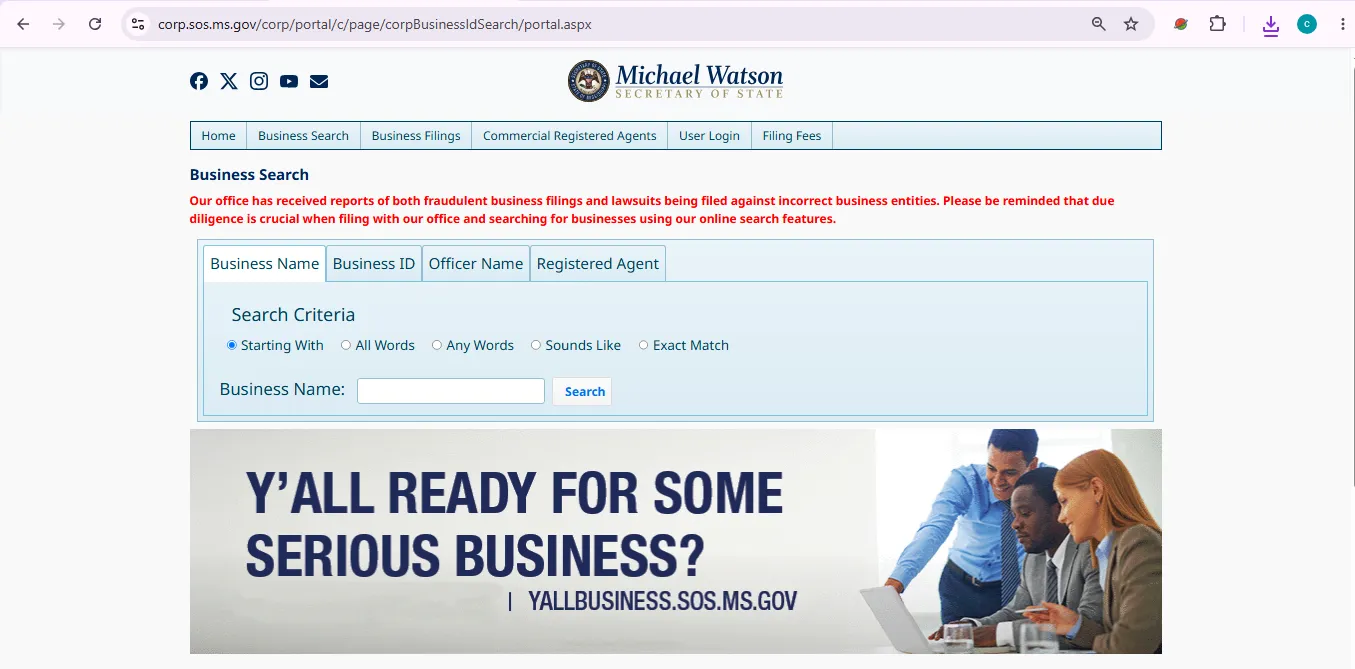
Image description: this user-help visual reference should show the official Mississippi SOS Business Search screen where users can search by business name, business ID, officer name, or registered agent. It is not a claim that this website is the official Mississippi government website.
Choose the correct search tab
Use Business Name for a company name, Business ID for exact lookup, Officer Name for a connected person, and Registered Agent for agent-based lookup.
Start broad, then narrow
Use a strong unique word first. If results are weak, try All Words or Any Words. Use Exact Match only when you know the legal name exactly.
Open the result, not just the list
Do not rely on the result line only. Open the business record and review status, Business ID, entity type, officers, registered agent, and filing details.
Save the Business ID
The Business ID is the most useful reference for annual reports, document orders, support calls, and later exact lookup.
Check officer and agent details
If you are verifying a company, compare officer names, registered agent, and address details with invoices, contracts, bank forms, and official filings.
Use follow-up services only after confirming the record
Order certificates, certified copies, or file annual reports only after confirming the exact business entity and Business ID.
How to Read a Mississippi Business Record Without Misunderstanding It
A Mississippi SOS record is useful, but it does not prove every business fact. Read each field carefully before relying on it.
Business name
Match spelling, suffix, punctuation, and similar names carefully. Similar names can belong to unrelated entities.
Business ID
Save the Business ID for annual reports, document orders, support calls, and exact future searches.
Entity type
LLC, corporation, nonprofit, foreign entity, partnership, and other entity types may have different filing rules.
Status
Status helps you understand whether the entity appears active, dissolved, revoked, administratively dissolved, or otherwise changed.
Registered agent
The registered agent receives legal and official notices. Agent information is not always the same as a storefront or operating office.
Documents and filings
Use document-order tools when you need Certificates of Fact, Good Standing/Existence, or certified copies of business filings.
Mississippi Search Types Explained Name, ID, Officer and Agent
Each search tab answers a different question. Use the right one instead of repeating the same failed name search.
| Search type | Use it when | Best input | Action / Note |
|---|---|---|---|
| Business Name | You know the LLC, corporation, nonprofit, or company name. | Unique words from the legal name. | Search name |
| Business ID | You already have the exact Mississippi Business ID. | The full Business ID from a record, notice, or filing. | Search ID |
| Officer Name | You know a person connected to the business but not the exact entity name. | Officer first/last name or strongest name part. | Search officer |
| Registered Agent | You know the registered agent name or want entities tied to an agent. | Individual or company registered-agent name. | Search agent |
| Search criteria | Your first search gives too many or too few results. | Starting With, All Words, Any Words, Sounds Like, Exact Match. | Use broad criteria first, then narrow. |
Mississippi Annual Reports Business ID and Online Filing
Annual report questions often start with a business search because Mississippi requires the Business ID number to begin.
For-profit corporations and LLCs
Annual reports may be filed on or after January 1 and are due by April 15 of that year.
Annual report rulesNonprofit corporations
Nonprofit annual reports may be filed on or after January 1 and are due by May 15 of that year.
Nonprofit report infoOnline only
Mississippi states all annual reports must be filed online through the filing portal.
File onlineCertificates, Good Standing and Certified Copies After You Find the Entity
Search results are useful for quick checking. Certificates and certified copies are used when someone needs official proof.
Certificate of Fact
Use when a bank, lender, vendor, agency, or contract requests official Mississippi business record proof.
Order documentsGood Standing / Existence
Certificates of Good Standing/Existence may be ordered online after login through Mississippi SOS document services.
Certificate helpCertified copies
Certified copies of business filings may be ordered online. Most certificates and copies are available immediately upon payment.
Certified copiesFraud Prevention and Due Diligence Why Search Details Matter
Business search is not only for curiosity. It helps avoid wrong-entity filings, fake companies, incorrect lawsuits, and misleading documents.
Due diligence checklist
- Compare business name exactly with contract, invoice, W-9, website, and bank information.
- Save the Business ID before ordering documents.
- Review registered agent and officer details.
- Check whether the business has been administratively dissolved or changed status.
- Use official SOS pages when paying for documents or filings.
Do not assume
- A listing proves the business is licensed.
- A registered agent is the business owner.
- A similar name is the same company.
- A third-party profile is current.
- An SOS record proves taxes, insurance, permits, or trustworthiness.
Mississippi Business Search Fees and Actions What Is Free vs Paid
Search is free. Filings, documents, certificates, certified copies, trademarks, and some related services may require payment through official channels.
| Service or task | Cost / status | Best for | Action / Note |
|---|---|---|---|
| Business Search | Free lookup | Searching by business name, Business ID, officer, or registered agent. | Search now |
| Business Filings | Fee-based depending on filing | Formation, amendments, annual reports, and related official filings. | Login to file |
| Annual Reports | Online filing required | Keeping corporations, LLCs, and nonprofits compliant. | Annual report info |
| Certificates of Fact / Good Standing / Existence | Fee-based | Official proof for banks, lenders, vendors, agencies, and contracts. | Order documents |
| Certified copies | Fee-based | Obtaining certified copies of business filings. | Most are available immediately after payment. |
| Fees & Forms Directory | Official fee lookup | Checking current forms and listed filing fees. | Open directory |
Common Mississippi Business Search Problems and Fast Fixes
If your search fails, change the tab or criteria before assuming the business does not exist.
No results found
Remove LLC, Inc, Company, Corporation, punctuation, and extra words. Try Any Words or Sounds Like.
Too many results
Use All Words, add one stronger key word, or switch to Business ID if you have it.
Need annual report
Search the company first and save the Business ID. Mississippi says the Business ID is needed to begin annual report filing.
Business name changed
Try Officer Name or Registered Agent search if the business name search does not show the expected record.
Need official proof
Use Order Documents after confirming the exact business record, not before.
Wrong entity risk
Compare name, ID, agent, status, and officers before filing lawsuits, contracts, liens, or official documents against a business.
Mississippi SOS Business Services Phone, Address and Map
Use this contact information for Mississippi business search, annual report, document order, filing, registered agent, and business services questions.
Business Services
Phone: 601-359-1633
Fax: 601-359-1607
Document help: 601-359-1633 or 1-800-256-3494
Physical address
Mississippi Secretary of State
660 North Street
Jackson, MS 39201
Mailing address
P.O. Box 136
Jackson, MS 39205-0136
Use mailing only when official instructions require documents by mail.
Official Mississippi Business Entity Resources Use These After Reading
These are official Mississippi Secretary of State resources for business search, filings, registered agents, documents, annual reports, forms, and fraud-prevention checks.
Business Search
Main official lookup for Mississippi businesses by name, Business ID, officer, or registered agent.
Open Business SearchBusiness Services hub
Official hub for Business Search, Business Filings, registered agents, documents, annual reports, and FAQs.
Open hubBusiness Filings login
Use for online filing actions, annual reports, and business filing menu options.
Login to fileOrder Documents
Order Certificates of Fact, Good Standing/Existence, and certified copies of business filings.
Order documentsAnnual Reports
Check Mississippi annual report deadlines, online filing requirement, and Business ID requirement.
Annual report infoRegistered Agents
Learn about Mississippi registered agents and commercial registered agent resources.
Agent infoFees & Forms Directory
Check official form titles, instructions, and listed filing fees.
Fees and formsFraud Prevention Act
Use when you are concerned about unauthorized, deceptive, or suspicious business filings.
Fraud preventionBusiness FAQs
Use Mississippi SOS business FAQs for common filing, search, annual report, and service questions.
Find FAQsMississippi Business Entity Search FAQ
Is the Mississippi business entity search free?
Yes. The Mississippi Secretary of State Business Search is free for public lookup. Fees apply for filings, certificates, certified copies, document orders, and other paid services.
Where do I search for a Mississippi LLC or corporation?
Use the official Mississippi Secretary of State Business Search page. You can search by Business Name, Business ID, Officer Name, or Registered Agent.
Can I search Mississippi businesses by Business ID?
Yes. The official Business Search page includes a Business ID search tab. This is the best option when you need an exact record.
Can I search by officer name in Mississippi?
Yes. The official search page includes Officer Name search. Use it when you know a person connected with the business but not the exact business name.
Can I search by registered agent in Mississippi?
Yes. The official search page includes Registered Agent search. Use it when you know the agent name or want to compare entities tied to an agent.
When are Mississippi annual reports due?
For-profit corporations and LLCs may file on or after January 1 and are due April 15. Nonprofit corporations may file on or after January 1 and are due May 15.
Are Mississippi annual reports filed online?
Yes. Mississippi states that all annual reports must be filed online through the official filing portal.
How do I order a Mississippi Certificate of Good Standing or Existence?
Search the business first, confirm the exact entity and Business ID, then use the official Order Documents page to request Certificates of Fact, Good Standing/Existence, or certified copies.
Who do I call for Mississippi business search help?
Call Mississippi Secretary of State Business Services at 601-359-1633. For document-order help, the Order Documents page also lists 1-800-256-3494.
Does a Mississippi SOS record prove a business is licensed or trustworthy?
No. A Mississippi SOS record mainly shows business filing information. For licenses, permits, taxes, insurance, professional approvals, or fraud concerns, check the correct agency or professional adviser.
Final Practical Advice
For most users, the safest Mississippi business entity search workflow is simple: search the official Business Search by name, open the matching record, save the Business ID, confirm status, review officers and registered agent, then use annual report, document order, or filing tools only after confirming the exact entity.
Best path: Business Search → open entity record → save Business ID → verify status, officer and agent → use annual report or document-order services only when needed.
Editorial verification note: official Mississippi Secretary of State resources checked on July 13, 2026. This guide is informational and does not provide legal, tax, licensing, fraud-investigation, or business formation advice.