
Find Minnesota Business Filings Fast
This guide helps you use Minnesota Secretary of State Business Filings Online to look up LLCs, corporations, assumed names, nonprofits, file numbers, filing history, certificates, copies and renewal options.
Use it before filing a renewal, checking a name, ordering a certificate, reviewing a vendor, or deciding whether a third-party lookup page is simply repackaging public SOS data.
Fast answer: Use Minnesota Secretary of State Business Filings Online to search by Business Name or File Number. You can adjust Search Scope, Filing Status, Include Prior Names, Begins With / Contains, and Active / Inactive options.
Best practical workflow: search the business name broadly → open the matching result → click Details → review Business Record Details → check Filing History → save the file number → order copies or a certificate only if official proof is needed.
Important note: Minnesota business filing records are useful for entity verification, but they do not prove licensing, tax compliance, insurance, professional approval or trustworthiness.
I Want To… Pick the Correct Minnesota SOS Path
Start with your exact job. Minnesota separates search, details, filing history, copies, certificates, renewals, amendments, name availability and new-business filing.
Find an LLC or corporation
Use business name search when you know the company name, partial name or brand-like wording.
Search businessUse file number
Use file number search when you already have the exact Minnesota SOS file number from a record or filing.
Search file numberOrder copies
Open Business Record Details, review Filing History, select available filings and order copies when required.
Copy instructionsCheck name availability
Use Minnesota’s name availability workflow before committing to branding, forms, banking or online presence.
Name availabilityRenew a filing
Use annual renewal instructions if your entity type requires renewal and you need to keep the record active.
Renewal helpAmend a record
Use amendment options from the Business Record Details page when a record needs an update.
Amendment helpStart a business
Use Business Filings Online to file a new business or nonprofit after choosing the correct business structure.
Start filingAsk Business Services
For Minnesota business filing questions, contact Business Services by phone or email, or schedule an appointment.
View contactMinnesota Search Helper Before You Click
Tap your situation. This helps you choose the correct search option and avoid missing active, inactive or prior-name records.
Choose your search situation
How to Search Minnesota Business Filings by Name or File Number
Use the official Business Filings Online screen and choose the search type that matches what you already know.
Open official Business Filings Online
The official page lets you search by Business Name or File Number and adjust search scope, filing status and prior-name options.
Open official Minnesota search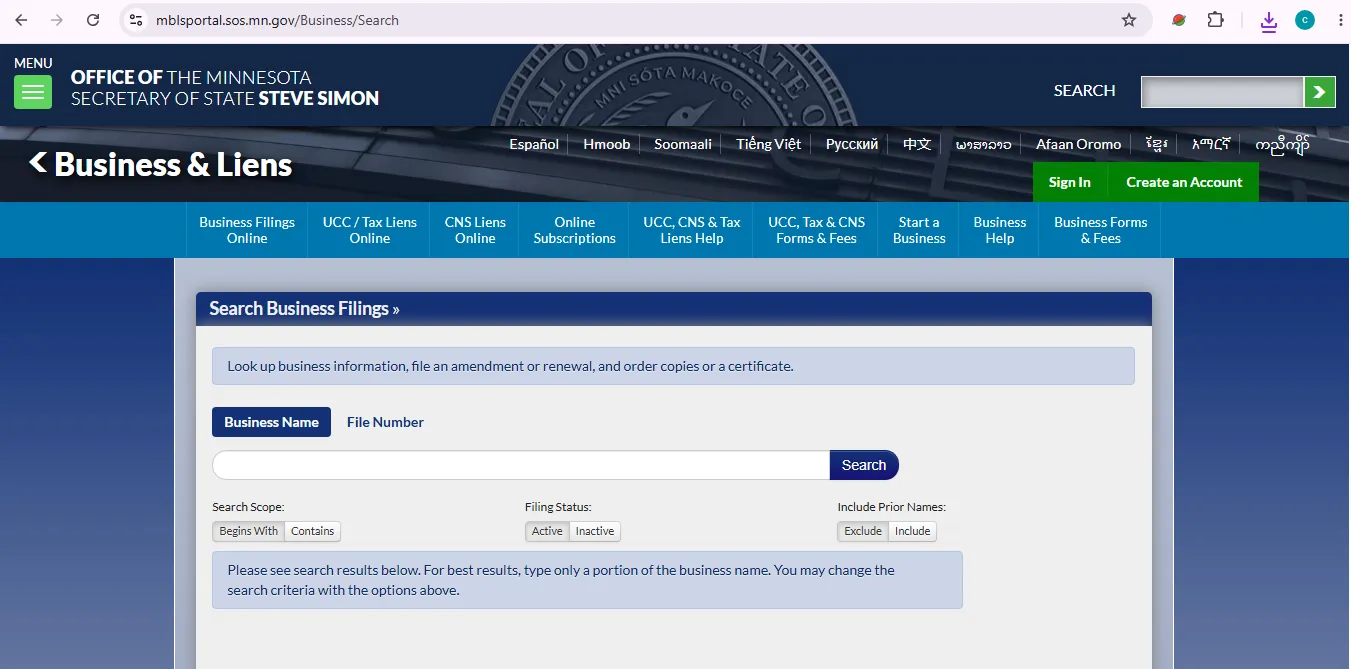
Image description: this user-help visual reference shows the Minnesota Secretary of State Business Filings Online search screen where users can search by business name or file number and adjust options such as search scope, filing status, prior names, begins with, contains, active and inactive. It is not a claim that this website is the official Minnesota SOS website.
Search by Business Name first
Type only the most unique part of the name. If the exact legal name fails, remove punctuation, LLC, Inc, Company and unnecessary words.
Use File Number for exact matching
If you have the file number, click File Number above the search box and search that number directly instead of comparing similar business names.
Use Contains when you are unsure
Begins With shows names that start with the words you enter. Contains shows business names that contain the words anywhere in the name.
Change Active or Inactive when needed
If you cannot find a dissolved, old or non-current business, change Filing Status from Active to Inactive and search again.
Include prior names when history matters
If a business may have changed its name, choose Include Prior Names so the system searches current and prior business names.
Open Details, then review Filing History
Click Details beside the business name. On the Business Record Details page, review Filing History for filing dates and filing information.
Order copies only after confirming the record
If you need filing documents, select the correct filing at the bottom of the record page and use the official order copies process.
How to Read a Minnesota Business Record Without Mistakes
A filing record is useful only when you know what the fields can and cannot prove.
Business name
Compare exact spelling, suffix, punctuation and prior-name history. Similar names may belong to unrelated businesses.
File number
Save this number. It is the safest reference for future lookup, renewals, copies, certificates and Business Services questions.
Business type
LLC, corporation, nonprofit, assumed name, LLP, LP and trademark records do not mean the same thing.
Filing status
Status helps you understand whether the record appears active, inactive, expired, dissolved or otherwise changed.
Filing history
Filing History shows filing dates and filing information. Use it before ordering copies or making renewal decisions.
Copies and certificates
Order copies or certificates only after confirming the exact business name, file number and filing history.
Active, Inactive, Begins With, Contains and Prior Names Minnesota Filter Guide
The filters below decide whether you see a narrow result list or a more complete history.
| Search option | What it does | Best for | Action / Note |
|---|---|---|---|
| Business Name | Searches by name text entered in the search box. | Most LLC, corporation, nonprofit and assumed-name searches. | Use only the strongest unique words first. |
| File Number | Searches by exact Minnesota SOS file number. | Exact record matching. | Use when you already have the file number. |
| Begins With | Displays names that start with the words entered. | When you know the exact beginning of the name. | Can miss results if the legal name starts differently. |
| Contains | Displays names containing the words anywhere in the name. | Broader searching and uncertain names. | Good when exact name format is unclear. |
| Active | Shows currently active records. | Current verification. | Default-style search for most users. |
| Inactive | Shows inactive records. | Dissolved, expired or older records. | Use when active search fails. |
| Include Prior Names | Searches current and prior business names. | Name-change history. | Important for older contracts, invoices or vendor checks. |
Minnesota Business Name Availability Before You File
Minnesota’s name availability process uses the official filing system. The state warns users to choose the entity designation from the drop-down menu instead of typing it manually.
Good screening method
- Search the proposed name without LLC, Inc or punctuation first.
- Use Contains to catch names where your phrase is not at the beginning.
- Include prior names if name history matters.
- Use the official name availability workflow before filing.
- Choose the entity designation from the drop-down menu, not by typing it.
Do not rely on these alone
- Domain name availability.
- Google search results.
- Social media handles.
- Assumed name search only.
- A third-party business lookup page.
Renewals, Amendments, Copies and Certificates After You Find the Record
Search first. Then use Business Record Details for renewals, amendments, copies or certificates only after confirming the correct file number.
Annual renewal
Minnesota explains that many business filing types must file an annual renewal once every calendar year beginning the year after original filing.
Renewal helpAmendment
Use File Amendment/Renewal from Business Record Details when available. Not all amendment types can be processed online.
Amendment helpCopies and certificates
Use the filing-history area and official copy/certificate ordering process after confirming the exact record.
Copy instructionsMinnesota Business Filing Fees Common Online Filing Costs
Business search is free. New filings, name reservations, trademarks and business registrations have listed fees. Always confirm the latest total in the official system before paying.
| Service or filing | Listed fee | Best for | Action / Note |
|---|---|---|---|
| Business filing search | Free | Looking up Minnesota business names, file numbers, active/inactive records and filing history. | Search official database |
| Assumed Name | $50.00 | Filing an assumed business name. | Renewal may be required to keep the filing current. |
| Domestic Business Corporation | $155.00 | Creating a Minnesota business corporation. | Confirm corporation is the right structure before filing. |
| Foreign Business Corporation | $220.00 | Registering an out-of-state corporation in Minnesota. | Use foreign registration, not domestic formation. |
| Domestic Limited Liability Company | $155.00 | Creating a Minnesota LLC. | Most common small-business entity type, but not always the right choice. |
| Foreign Limited Liability Company | $205.00 | Registering an out-of-state LLC in Minnesota. | Check home-state document needs. |
| Domestic Limited Liability Partnership | $155.00 | LLP registration. | Common for certain professional or partnership structures. |
| Limited Partnership | $120.00 | Domestic or foreign LP filings. | Review LP requirements before filing. |
| Name Reservation | $55.00 | Holding a business name before filing. | Use only when you are not ready to file the entity immediately. |
| Domestic Nonprofit Corporation | $90.00 | Creating a Minnesota nonprofit corporation. | Nonprofit status and tax-exemption are separate issues. |
| Foreign Nonprofit Corporation | $70.00 | Registering an out-of-state nonprofit in Minnesota. | Confirm foreign nonprofit requirements. |
| Trademark | $70.00 | State trademark filing. | State trademark is not the same as federal trademark registration. |
Common Minnesota Business Search Problems and Fast Fixes
If you cannot find the filing, change the search method before assuming the business does not exist.
No results found
Use only a portion of the business name. Remove LLC, Inc, Company, punctuation and extra words.
Too many results
Add one more strong word, switch from Contains to Begins With, or use file number if available.
Inactive record missing
Change Filing Status to Inactive if the entity may be old, expired, dissolved or not currently active.
Prior name issue
Use Include Prior Names when the company may have changed its name or appears under old contracts.
Need official proof
Do not rely on screenshots if a bank, lender or vendor asks for a certificate or copy.
Mail solicitation concern
Use official Minnesota SOS pages for filings and renewal actions. Be careful with non-government mailers and paid third-party notices.
Local Insider Tips for Minnesota Corp & LLC Lookup
These practical habits make Minnesota SOS searching cleaner and safer.
For name search
- Start with only the unique name words.
- Use Contains when the legal name may not start with your term.
- Use Include Prior Names for older invoices, contracts or vendor records.
- Change to Inactive when the active search fails.
- Save the file number immediately when you find the correct record.
For verification
- Compare SOS name with invoice, W-9, contract, bank record and website footer.
- Review status and filing history before trusting the record.
- Order copies or certificates when official proof is requested.
- Use annual renewal help if the entity looks inactive or dissolved.
- Check other agencies for licenses, permits, taxes and professional approvals.
Minnesota SOS Business Services Phone, Address and Map
Business Services is appointment-only for in-person service. Use phone or email first when possible.
Business Services
Metro Area: 651-296-2803
Greater MN: 1-877-551-6767
Email: business.services@state.mn.us
Business Services address
First National Bank Building
332 Minnesota Street, Suite N201
Saint Paul, MN 55101
Hours and appointment note
Phone hours: 9:00 a.m. to 4:00 p.m.
Appointment hours: 8:00 a.m. to 4:00 p.m.
In-person appointments must be scheduled.
Official Minnesota Business Entity Resources Use These After Reading
These are official Minnesota Secretary of State resources connected to business entity lookup and filing tasks.
Business Filings Online
Main official search for Minnesota business names, file numbers, active/inactive records and filing history.
Open business searchHow to search business filings
Official instructions for business-name search, file-number search, Details, Filing History and ordering copies.
Open search helpName availability
Official workflow for checking whether a proposed Minnesota business name is available.
Check name helpAnnual renewal
Official help for renewing a Minnesota business filing and avoiding statutory dissolution.
Renewal helpBusiness Forms & Fees
Find forms and fees for corporations, LLCs, assumed names, nonprofits, partnerships, trademarks and name reservations.
Open feesStart a Business
Use this official hub before choosing a structure or starting a new filing.
Start guideBusiness Help
Official help center for online filing, accounts, payments, copies, service of process and business how-tos.
Business helpMail Solicitations
Review official guidance about non-government business mailings and avoid unnecessary third-party payments.
Mail solicitation helpMinnesota Business Entity Search FAQ
Is the Minnesota business entity search free?
Yes. Minnesota Secretary of State Business Filings Online can be used for free public lookup. Fees apply when filing business documents, ordering copies, certificates or other paid services.
Where do I search for a Minnesota LLC or corporation?
Use Minnesota Secretary of State Business Filings Online. You can search by Business Name or File Number and adjust search options such as Active, Inactive, Begins With, Contains and Include Prior Names.
Can I search Minnesota businesses by file number?
Yes. Click File Number above the search box, enter the file number and search. This is the best method when you already have the exact Minnesota SOS file number.
What does Contains mean in Minnesota business search?
Contains shows business names that contain the words you typed anywhere in the name. It is broader than Begins With and is useful when you are unsure how the legal name starts.
How do I find inactive Minnesota businesses?
Change Filing Status to Inactive. This is useful when you are searching for an expired, dissolved, older or non-current business record.
Can I search prior Minnesota business names?
Yes. Use Include Prior Names when you want the system to search both current business names and prior names on record.
How do I order Minnesota business filing copies?
Search the business, click Details, review Filing History, then select the filing document you need and use the official order copies process.
Do Minnesota businesses need annual renewal?
Many Minnesota filing types must file an annual renewal once every calendar year beginning in the calendar year after the original filing. Missing renewal can lead to statutory dissolution.
Who do I call for Minnesota business filing help?
Call Business Services at 651-296-2803 in the metro area or 1-877-551-6767 from Greater Minnesota. The Business Services email is business.services@state.mn.us.
Does a Minnesota SOS record prove a business is licensed or trustworthy?
No. A Minnesota SOS filing record mainly shows business registration information. Licenses, permits, taxes, insurance, professional approvals and fraud concerns may require checking other agencies or advisers.
Final Practical Advice
For most users, the safest Minnesota business entity search workflow is simple: search the business name, switch to Contains if needed, include prior names when history matters, open Details, save the file number, review Filing History, then order copies, certificates, renewals or amendments only after confirming the exact record.
Best path: Business Filings Online → search by name or file number → adjust Active/Inactive and prior-name filters → open Details → save file number → use copies, certificates or renewal tools only when needed.
Editorial verification note: official Minnesota Secretary of State resources checked on July 13, 2026. This guide is informational and does not provide legal, tax, licensing, fraud-investigation or business formation advice.