
Search New Mexico LLC, Corporation & Business Records
The official New Mexico business entity search is part of the Secretary of State’s Enterprise portal. Public users can search registered businesses by name or file number and open the matching entity record before filing amendments, reports or other maintenance documents.
New Mexico is unusual because standard LLCs do not file a recurring Secretary of State annual report, while profit corporations file corporate reports on a biennial schedule.
Fastest lookup: search by business name. If you already have the state file number, use it because it is the cleanest way to return to the exact entity.
Search problem to remember: New Mexico’s search can be sensitive to special characters. If the legal name contains punctuation or another special character, include it when the simpler version does not return the record.
Filing rule: New Mexico says business filings have moved online. Paper business applications are no longer accepted through Business Services.
How to Search New Mexico Business Records
Start with the public search before creating an account or opening a filing form. That keeps you from choosing the wrong entity or submitting a duplicate maintenance filing.
- Open the official New Mexico Business Search.
- Enter the business name or file number.
- If searching by name, begin with the strongest distinctive words.
- Use the Advanced options if the first search is too broad or returns no useful match.
- Open the matching business record rather than relying only on the results list.
- Save the exact business name, file number, status and search date before filing anything.
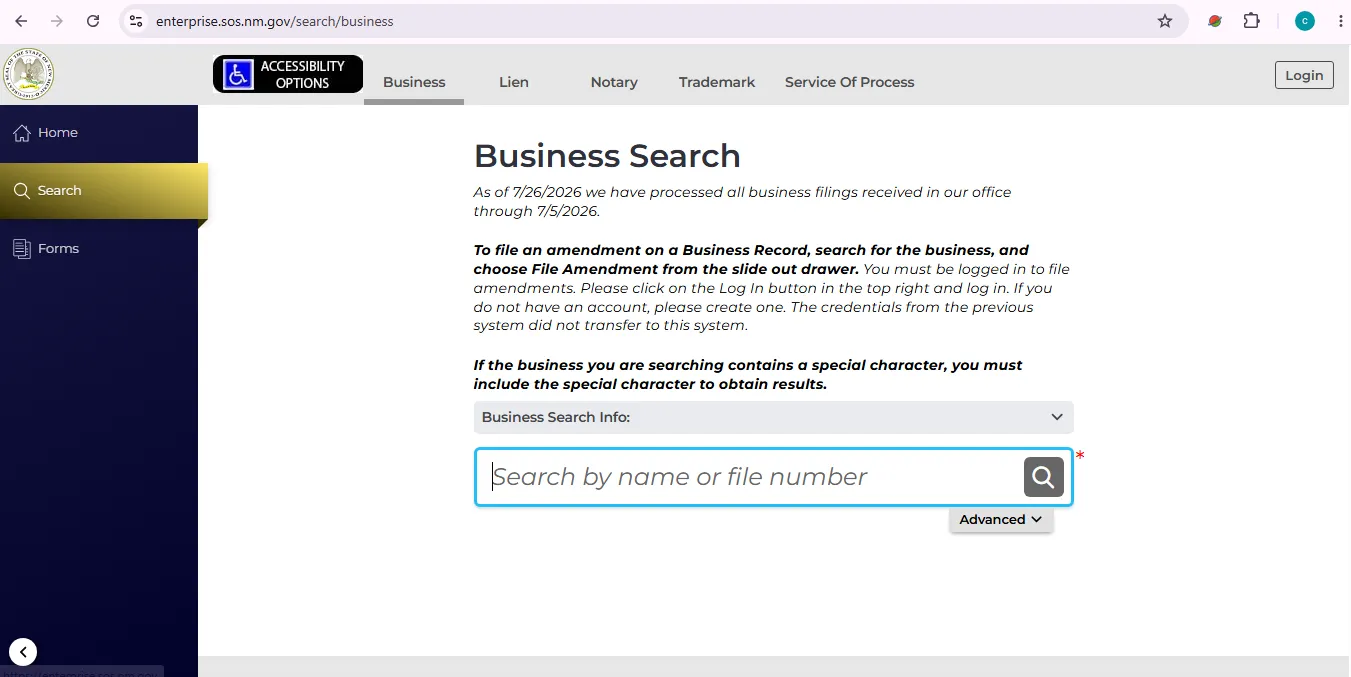
This visual is provided to help users recognize the search area and is not presented as proof that this informational website is an official New Mexico government website.
When to Use Advanced Search
The current New Mexico Enterprise search provides additional ways to narrow a business lookup beyond a basic name or file-number search.
| Search option | Best use | Practical advice |
|---|---|---|
| Contains | You know only part of the business name. | Use the most distinctive words rather than every word on an invoice or website. |
| Starts With | You know the beginning of the registered name. | Useful when the legal suffix or final wording is uncertain. |
| Name Availability | You are screening a proposed business name. | Treat a clear search as a preliminary check, not final state approval. |
| Entity Type | You need to separate LLCs, corporations, nonprofits or other entities. | Leave it broad on your first search unless the entity type is known. |
| Status | You need current or historical records. | Do not filter too aggressively when researching dissolved, revoked or older entities. |
| Registration Date | You know approximately when the entity was registered. | Helpful when many businesses share similar names. |
What to Check on a New Mexico Business Record
Confirm identity first
- Exact business name
- Business or file number
- Entity type
- State or jurisdiction of formation where shown
- Initial filing or registration date
Then check current record details
- Current status
- Registered-agent name and address
- Principal/business addresses shown
- Officer or director information for corporations where available
- Filed documents and available maintenance actions
New Mexico Business Name Availability & Reservation
A search with no obvious conflict is useful, but final name approval occurs through the Secretary of State filing process. New Mexico’s administrative rules say the filing office does not make a final availability determination until an appropriate name-reservation or organizational filing is submitted.
Before filing
- Search the exact proposed name.
- Search the strongest root words.
- Try singular and plural versions.
- Test punctuation and special-character variations.
- Use the portal’s Name Availability option.
Name reservation
New Mexico reserves an approved name for 120 days.
LLC reservation fee: $20.
Profit-corporation reservation fee: $25.
The current rules do not provide an extension of the 120-day reservation period.
Review New Mexico business statutes.
- Use the Limited Liability Companies section for LLC name rules and fees.
- Use the Business Corporations sections for corporate name requirements.
- Return to Enterprise and use Name Availability before filing.
- Do not rely only on a domain name, social handle or Google result.
New Mexico Reports: LLCs, Corporations & Nonprofits
The recurring filing rule depends on the entity type. This is one of the most important differences to understand before paying a filing service.
| Entity type | Recurring SOS report | Deadline | Current statutory fee |
|---|---|---|---|
| Standard LLC | No standard annual or biennial report under the New Mexico LLC Act. | Not applicable for a standard LLC periodic report. | $0 periodic-report fee |
| Domestic or foreign profit corporation | Initial corporate report, then biennial corporate reports. | Initial report within 30 days; then biennially by the 15th day of the fourth month after the end of the taxable year. | $25 |
| Nonprofit corporation | Initial report, then annual report. | Initial report within 30 days; then annually by the 15th day of the fifth month after the end of the taxable year. | $10 |
Common New Mexico Business Filing Fees
Public lookup is free. Filing fees depend on the entity type and the action being submitted.
| Service | Current statutory fee | What it means |
|---|---|---|
| Public Business Search | Free | Search business records by name or file number. |
| Domestic LLC Articles of Organization | $50 | Forms a New Mexico LLC. |
| LLC amended or restated articles | $50 | Changes or restates LLC organizational documents. |
| LLC registered office / agent change | $20 | Changes the registered office or registered agent, or both. |
| Foreign LLC registration | $100 | Registers an out-of-state LLC to transact business in New Mexico. |
| LLC certificate not otherwise specified | $25 | Applies to LLC certificates such as status-related certificate requests where applicable. |
| Profit corporation Articles of Incorporation | $100 minimum | Fee is based on authorized shares and can rise above the minimum. |
| Profit corporation biennial report | $25 | Recurring report for domestic and foreign profit corporations subject to the Corporate Reports Act. |
| Profit corporation good-standing certificate | $50 | Certificate of good standing and compliance for a corporation. |
| Nonprofit annual report | $10 | Annual Secretary of State report for nonprofit corporations. |
Certificates, Copies & Filing History
Use the public record first. Order a certificate or certified document only when a bank, lender, court, licensing body or other recipient requires formal evidence.
LLC records
The LLC statute currently lists $25 for a certificate not otherwise specified, $10 for a document from the Secretary of State’s records and a separate $25 certification charge.
Corporation records
The corporation statute lists $50 for a Certificate of Good Standing and Compliance, $10 for an uncertified copy and $25 for a certified copy.
New Mexico Business Filings Are Online
The Secretary of State says all business filings have moved to the online process. Business Services no longer accepts paper business applications.
- Search the business first and save the file number.
- Open Enterprise.
- Create an account or sign in.
- After login, locate the relevant business form under the portal’s Forms area.
- Complete the filing and review the fee before payment.
- Save the confirmation and any approved PDF after submission.
Common New Mexico Business Search Problems
| Problem | What to do |
|---|---|
| No results | Try fewer words, remove LLC/Inc./Corporation and retry with the exact special character if the legal name contains one. |
| Too many matches | Use one more distinctive word, the file number or Advanced filters such as entity type, status or registration date. |
| Need an exact entity | Use the file number from a prior filing, certificate, notice or search result. |
| Cannot find a filing form | Sign in to Enterprise and use the Forms area rather than the public search page. |
| Trying to file a paper business application | Use Enterprise. New Mexico says business filings are now online-only. |
| Going to the office on Friday | Business Services walk-in service is Monday through Thursday. Phone and online services remain available Friday. |
New Mexico Secretary of State Business Services Contact
Office address
New Mexico Secretary of State
Business Services Division
325 Don Gaspar, Suite 300
Santa Fe, NM 87501
Hours
General office hours:
8:00 a.m.–5:00 p.m.
Monday–Friday
Business Services walk-in:
Monday–Thursday only
Open the official New Mexico Secretary of State contact page.
Official New Mexico Business Resources
Public entity lookup by business name or file number, with advanced filters.
Create an account, file business documents and manage existing entity filings.
Official filing policy, walk-in information and business-service guidance.
State-provided help for the online business filing system.
Official index to corporation, LLC, nonprofit and partnership statutes.
Registered-agent forms, fictitious-name resources and related business information.
Use for UCC filings, trademarks, agricultural liens and other commercial records rather than ordinary entity lookup.
Current security and multi-factor-authentication information for Enterprise accounts.
New Mexico Business Entity Search FAQ
1. Is the New Mexico business entity search free?
Yes. The New Mexico Secretary of State provides a public business search through the Enterprise portal. Filing, certificate, copy and maintenance actions can have separate fees.
2. Where do I search for a New Mexico LLC or corporation?
Use the official Enterprise Business Search operated by the New Mexico Secretary of State. The public search accepts a business name or file number.
3. Can I search a New Mexico business by file number?
Yes. File number is the best option when you already have the exact identifier from a filing, notice, certificate or previous search result.
4. Why does the New Mexico search sometimes miss a business name?
Try fewer words and check punctuation or special characters. New Mexico’s search can require the special character to be entered exactly when it appears in the filed business name.
5. Do New Mexico LLCs file annual reports?
Standard New Mexico LLCs do not have a recurring annual or biennial Secretary of State report under the LLC Act. Corporations and nonprofits have different reporting requirements.
6. When is a New Mexico corporation biennial report due?
A domestic or foreign profit corporation files an initial report within 30 days of incorporation or qualification, then files biennially by the 15th day of the fourth month after the end of its taxable year. The current report fee is $25.
7. How much does it cost to form a New Mexico LLC?
The statutory fee for filing original Articles of Organization and issuing the certificate of organization is $50. The Enterprise checkout may also show applicable payment-processing charges.
8. How long does a New Mexico business name reservation last?
An approved reservation lasts 120 days. The current statutory reservation fee is $20 for an LLC name and $25 for a profit-corporation name.
9. Are New Mexico business filings accepted on paper?
No. The Secretary of State says all business filings have moved to the online process and paper business applications are no longer accepted.
10. What are New Mexico Business Services walk-in hours?
Business Services walk-in service is available Monday through Thursday. General office hours are 8:00 a.m.–5:00 p.m. Monday through Friday, and online and phone services remain available on Fridays.