
Search New Jersey LLC, Corporation & Business Records
New Jersey business entity records are maintained by the Department of the Treasury’s Division of Revenue and Enterprise Services, commonly called DORES. The official tools let you search registered businesses by name, keyword or 10-digit Entity ID.
After finding the correct entity, New Jersey’s Business Records Service can provide status reports, standing certificates and filed corporate or LLC documents.
Fastest lookup: use New Jersey’s official Business Entity Name Search. Start with Business Name or Keyword Search. If you already know the state’s 10-digit Entity ID, use that for an exact match.
Do not confuse two different tools: Search Registered Businesses finds entities already on file. Business Name Availability checks whether a proposed name may be used for a new formation.
For formal proof: a free name search is not the same as a Status Report or Standing Certificate. Use Business Records Service only after confirming the exact entity.
How to Search New Jersey Business Records
New Jersey separates basic registered-business lookup from its deeper Business Records Service. Start with the free name search, then move to reports or certificates only if needed.
- Open the official New Jersey Business Entity Name Search.
- Choose Business Name, Keyword Search or Entity ID under Search Registered Businesses.
- Enter as much of the name as you are sure of.
- Leave endings such as LLC, Inc. or Company out if you are unsure of the exact legal name.
- Open the matching record and copy the 10-digit Entity ID.
- Use the Entity ID for later status reports, standing certificates, documents and support questions.
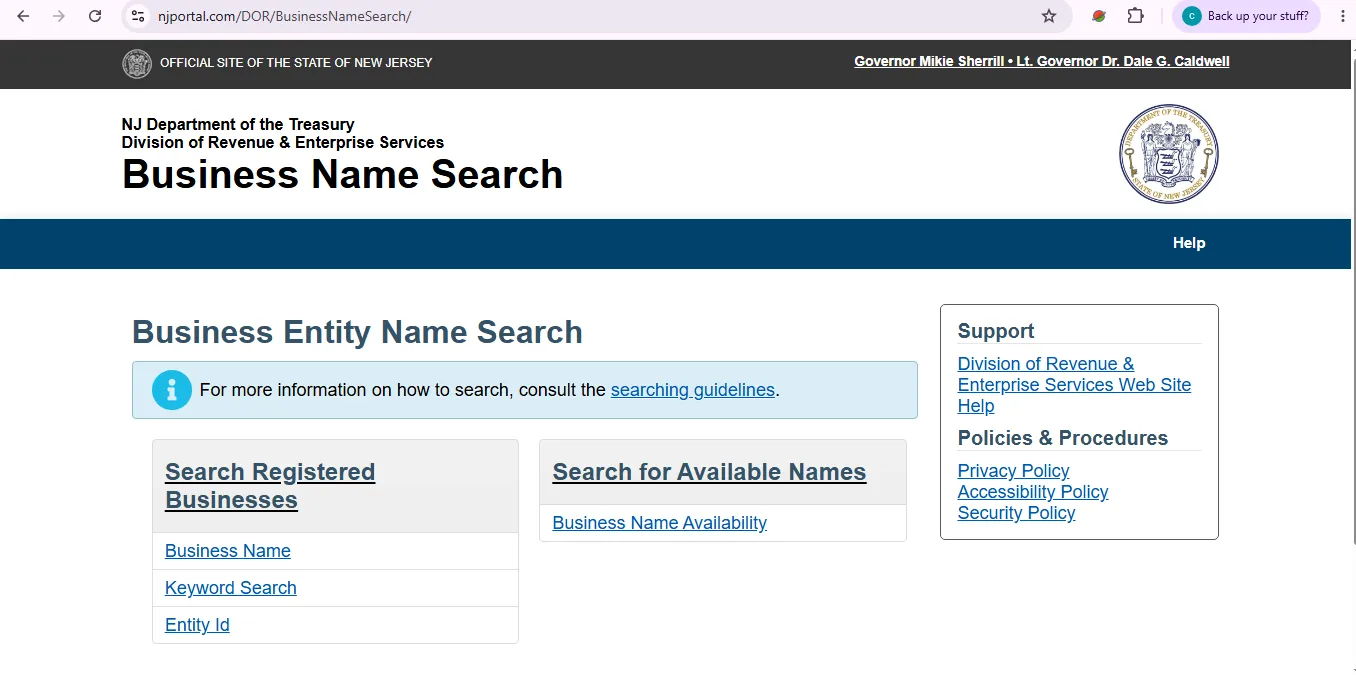
This visual helps users identify where New Jersey separates registered-business searches from Business Name Availability. The live state interface may change over time.
Business Name, Keyword and Entity ID Searches
| Search type | Best use | Important detail |
|---|---|---|
| Business Name | You know most or all of the registered entity name. | New Jersey’s records search automatically helps with name prefixes; enter only the portion you are confident about. |
| Keyword Search | You know a distinctive word but not the complete registered name. | Useful for businesses whose legal wording differs from a sign, website or informal brand. |
| Entity ID | You already have New Jersey’s state identifier. | The Entity ID search requires the exact 10-digit ID; partial or wildcard searches are not allowed. |
What a New Jersey Business Record Can Tell You
Core identity information
- Registered business name
- 10-digit Entity ID
- Entity type
- Original filing date
- Home jurisdiction where applicable
- Current legal status
Useful compliance details
- Registered agent and office
- Main and principal business addresses where reported
- Date of the last annual report
- Most recently reported officers, directors, managers or members where available
- Associated, previous or alternate names
Registered Business Search vs. Name Availability
The official search page has two different purposes. They should not be treated as interchangeable.
Search Registered Businesses
Use this to find entities already in New Jersey’s database. Results can appear regardless of whether the entity is currently active or whether its name could be used for a new filing.
Business Name Availability
Use this when planning a new LLC, corporation, LP or LLP and you need to see whether the proposed name can move into the Business Formation process.
New Jersey’s available-name search ignores certain differences such as capitalization, spaces, common punctuation, leading articles and some common words when looking for similar names.
Read New Jersey’s official business-name availability guidance.
- Search registered businesses first.
- Try the exact proposed name and its strongest keywords.
- Use Business Name Availability for the formation-name check.
- Wait for the state filing process before treating the name as accepted.
Status Reports and Standing Certificates
Use the free entity search for basic lookup. Use Business Records Service when a bank, lender, attorney, vendor, government agency or transaction requires a more formal record.
Business Entity Status Report
A status report can include legal status, registered agent and office, addresses, filing date, last annual report information and reported principals.
Current listed fee: $5 plus a $1.25 online convenience fee.
Standing Certificate
Standing certificates are certified under the seal of the State Treasurer and provide formal evidence of the entity’s legal standing.
Certificate types and prices depend on the business type and the amount of detail requested.
| Official record | Current listed fee | Typical use |
|---|---|---|
| Business Entity Status Report | $5 + $1.25 online convenience fee | Lower-cost official entity information when a certified standing document is not required. |
| Corporate / LP Standing Certificate | $25 | Standing proof for corporations and limited partnerships. |
| LLC / LLP Short Form Standing | $50 | Short-form certified standing proof. |
| LLC / LLP Long Form Standing | $100 | More detailed standing information when specifically required. |
Open the official New Jersey Business Records Service.
- Choose Business Entity Standing Certificates or Business Entity Status Reports.
- Select a search type.
- Search by Business Name, Entity ID, Principal Name, Registered Agent or Associated Name where offered.
- Confirm the exact entity before paying.
- Download and save the resulting document after checkout.
Copies of New Jersey Business Entity Documents
The Business Records Service can provide filed corporate and LLC documents such as original formation documents, amendments and registered-agent or office changes.
New Jersey’s current public-record fee guidance lists photocopies at $0.10 per page. Certified copies carry an additional certification charge, with different amounts possible for LLC records.
Open New Jersey Business Entity Documents search.
- Find and save the exact Entity ID first.
- Choose Business Entity Documents.
- Search by Entity ID when possible.
- Identify the specific filing instead of ordering every document unless you actually need the full record.
- Save the access key or confirmation information supplied after the transaction.
New Jersey Annual Reports: Due Month and Current Fees
New Jersey business entities file annual reports in the anniversary month of formation or authorization. The state says a reminder is sent to the registered agent about 60 days before the report is due.
The report updates the public record with current information such as officers or members, main business address and registered agent.
| Business type | Current online annual-report fee | Payment service fee |
|---|---|---|
| For-profit corporation | $75 | $3 credit card / $0.50 e-check |
| Nonprofit corporation | $30 | $3 credit card / $0.50 e-check |
| Limited partnership | $75 | $3 credit card / $0.50 e-check |
| Limited liability partnership | $75 | $3 credit card / $0.50 e-check |
| Limited liability company | $75 | $3 credit card / $0.50 e-check |
Open New Jersey Annual Reports and Change Services.
- Start the Annual Report filing.
- Identify the exact entity using the requested business information.
- Review officers, members, addresses and registered-agent information.
- Complete the required worker’s-compensation section even if the business is not required to carry coverage; the portal provides a “No” option where applicable.
- Pay the filing fee and download the filing certificate after submission.
If a New Jersey Business Is Revoked or Inactive
The Annual Reports and Change Services portal can be used to reinstate eligible business entities. The amount due normally includes required outstanding annual reports plus the applicable reinstatement filing fee.
| Entity type | Current reinstatement fee | Additional issue to check |
|---|---|---|
| For-profit corporation | $95 | Outstanding annual reports and, in some older revocation cases, tax-clearance requirements. |
| Domestic nonprofit corporation | $150 | Registered-agent change may add $25 if needed. |
| Foreign nonprofit corporation | $200 | Registered-agent change may add $25 if needed. |
| LP / LLP / LLC | $75 | Outstanding annual reports apply; some older LLC/LP cases may also require tax clearance. |
Registered Agent and Registered Office
New Jersey’s public-record filing requires a registered office with a New Jersey street address. A post-office box may be used only when the street address is also provided.
What the record can show
- Registered-agent name
- Registered-office address
- Agent information used for official service
- Updates reported in annual or change filings
What not to assume
- The registered agent is not necessarily the business owner.
- The registered office may not be a storefront or customer-service location.
- A professional agent may represent many unrelated entities.
Common New Jersey Business Record Fees
| Service | Current listed fee | When it helps |
|---|---|---|
| Business Entity Name Search | Free browsing | Find registered names and 10-digit Entity IDs before paying for another service. |
| Status Report | $5 + $1.25 online convenience fee | Detailed official entity information without ordering a standing certificate. |
| Corporation / LP Standing Certificate | $25 | Certified legal-status proof. |
| LLC / LLP Short Standing Certificate | $50 | Short-form certified standing proof. |
| LLC / LLP Long Standing Certificate | $100 | More detailed certified status information. |
| Photocopy | $0.10 per page | Non-certified copy of a filed business record. |
| Change Registered Agent / Office | $25 | Updating the public record when the agent or registered office changes. |
| LLC Annual Report | $75 | Required annual maintenance filing. |
| Business Name Reservation | $50 | Reserving an eligible entity name before formation where appropriate. |
Check the current New Jersey registry fee schedule before paying.
Trade Names, Alternate Names and Legal Entity Names
New Jersey uses different naming systems depending on the business structure.
Alternate name
Corporations, LLCs and certain other entities can register an alternate name with the state when they want to transact under another name.
Sole proprietor / general partnership DBA
New Jersey’s business guidance says sole proprietors and general partnerships using a business name other than the owners’ names generally register the trade name with the local county clerk.
Common New Jersey Search Problems
| Problem | Best next step |
|---|---|
| No result for the full business name | Remove LLC, Inc., Company and other endings. Search only the part of the name you are certain about. |
| Too many name matches | Use Keyword Search or compare Entity IDs, addresses, status and associated names. |
| Entity ID search fails | Check that all 10 digits are entered. The official Entity ID search does not accept partial numbers or wildcards. |
| Need to search by person | Use Business Records Service. Its status, standing and document searches can offer Principal Name as a search type. |
| Need to search by registered agent | Use Business Records Service rather than the basic Business Entity Name Search. |
| Recent filing is missing from report | Allow for state update timing. Status reports may take two business days to reflect electronic filings. |
| Certificate still shows older data | Standing-certificate records are generally updated by 10:00 a.m. the next business day after an electronic filing. |
New Jersey DORES Contact Information
Revenue Business Services
Phone: 609-292-9292
Use for business registration, annual reports, reinstatement, registered-agent changes and related entity-filing questions.
Annual Report Technical Help
NJ e-Government Services Help Desk: 609-586-2600
Use this number for technical problems with the online annual-report application.
In-Person Service Area
Division of Revenue & Enterprise Services
33 West State Street, 5th Floor
Trenton, NJ 08608
New Jersey recommends making an appointment when visiting to discuss an issue or pick up a completed work order.
Business Records Mailing Address
Division of Revenue & Enterprise Services
P.O. Box 450
Trenton, NJ 08646-0303
Use the address shown on the specific service instructions when mailing a filing or record request.
Official New Jersey Business Entity Resources
Free registered-business lookup by Business Name, Keyword Search or 10-digit Entity ID, plus Business Name Availability.
Standing certificates, status reports, corporate and LLC documents, business lists and certificate validation.
File annual reports, change registered agent or office, reinstate entities, amend records and close businesses.
Certificate types, fees, ordering methods and update timing.
Explains what information appears in status reports, standing certificates, registration certificates and other record services.
Current statutory fees for business filings, certificates, copies, status reports and agent changes.
Official explanation of New Jersey name browsing and availability checks.
Main New Jersey Treasury hub for business filings, records, certifications, annual reports and related services.
New Jersey Business Entity Search FAQ
1. Is the New Jersey business entity search free?
Yes. New Jersey lets users browse registered business names and 10-digit Entity IDs online without paying for a status report or standing certificate.
2. Where do I search for a New Jersey LLC or corporation?
Use the official New Jersey Treasury Business Entity Name Search at njportal.com/dor/businessnamesearch. It supports Business Name, Keyword Search and Entity ID lookup.
3. What is a New Jersey Entity ID?
It is the 10-digit identifier used for New Jersey corporate business records. The official Entity ID search requires the exact 10 digits and does not allow partial or wildcard searches.
4. Is Business Name Availability the same as searching registered businesses?
No. Registered-business search shows entities already in the state database, regardless of whether a similar name could be used for a new business. Business Name Availability is specifically for proposed formation names.
5. Can I search New Jersey business records by registered agent or principal name?
Yes, through Business Records Service. Its status-report, standing-certificate and document searches can offer Principal Name, Registered Agent and Associated Name as search types. The basic Business Entity Name Search is different.
6. When is a New Jersey annual report due?
Annual reports are filed in the anniversary month of the entity’s formation or authorization. New Jersey states that a reminder is sent to the registered agent about 60 days before the report is due.
7. How much is a New Jersey LLC annual report?
The current online Annual Reports and Change Services FAQ lists the LLC annual-report filing fee at $75, plus the applicable online payment service fee.
8. How much is a New Jersey Standing Certificate?
Corporate and limited-partnership standing certificates are currently listed at $25. LLC and LLP short-form standing certificates are $50, while long-form LLC and LLP standing certificates are $100.
9. What is the difference between a Status Report and a Standing Certificate?
A Status Report is a lower-cost business record that can show legal status, agent, addresses, principals and annual-report information. A Standing Certificate is a certified state document attesting to the legal status of the entity.
10. Is a New Jersey registered agent necessarily the business owner?
No. A registered agent receives official notices for the entity. The registered-agent record should not be treated as proof of ownership, management or the company’s operating location.