
Find Kansas Business Records
This guide helps you use the official Kansas Secretary of State business search to look up LLCs, corporations, limited partnerships, LLPs, foreign entities, business IDs, information reports, certified copies and good standing certificates.
Use it before you register a Kansas business, file an information report, order a certified copy, check a name, verify a resident agent, or trust a third-party business lookup page.
Fast answer: Use the official Kansas Secretary of State Business Search page to look up Kansas corporations, LLCs, limited partnerships, LLPs and foreign businesses registered to do business in Kansas.
What the Kansas SOS maintains: the Business Services Division files and maintains records for corporations, LLCs, limited partnerships, LLPs and supporting documents such as mergers, dissolutions, cancellations, withdrawals and information reports.
Best practical workflow: search the business name broadly → open the matching record → copy the business ID → check status and resident agent details → view free file-stamped copies when available → buy certified copies or Certificate of Good Standing only if required.
I Want To… Pick the Correct Kansas SOS Path
Choose the task first. Kansas business search, registration, report filing, certified copies and good standing certificates are related, but each has a different purpose.
Search a business
Use KSSOS Business Search when you know the Kansas business name, business ID, LLC name, corporation name or foreign entity name.
Search businessUse business ID
Use business ID when you need the exact record for certified copies, Certificate of Good Standing or report filing.
Search by IDRegister a business
Use the Register a Business page for Kansas domestic entities and foreign businesses doing business in Kansas.
Register pageFile information report
Kansas information reports are filed every two years. Due dates depend on entity type and odd/even formation year.
Report infoView file-stamped copies
Kansas says documents filed by a business are available to view and print online without cost, except tax documents.
Copies helpOrder certified proof
Use certified copies or Certificate of Good Standing when a bank, agency, lender, vendor or contract requires official proof.
CertificatesCheck name availability
Search similar names before registering. Do not rely only on domain, social handle or Google result availability.
Name guidanceAsk KSSOS
For business filing assistance, contact Business Services at 785-296-4564 or kssos@ks.gov.
View contactKansas Search Helper Before You Click
Tap the situation closest to your task. This helps avoid ordering a certificate when a free lookup or file-stamped copy is enough.
Choose your search situation
How to Search Kansas Business Entities on the Official KSSOS Page
Use this section while you are on the official Kansas search page. The visual reference belongs here because this is where users need screen guidance.
Open the official Kansas Business Entity Search
Start on the KSSOS Business Search page from the official Kansas Secretary of State website. The search page may require browser JavaScript verification before loading.
Open official search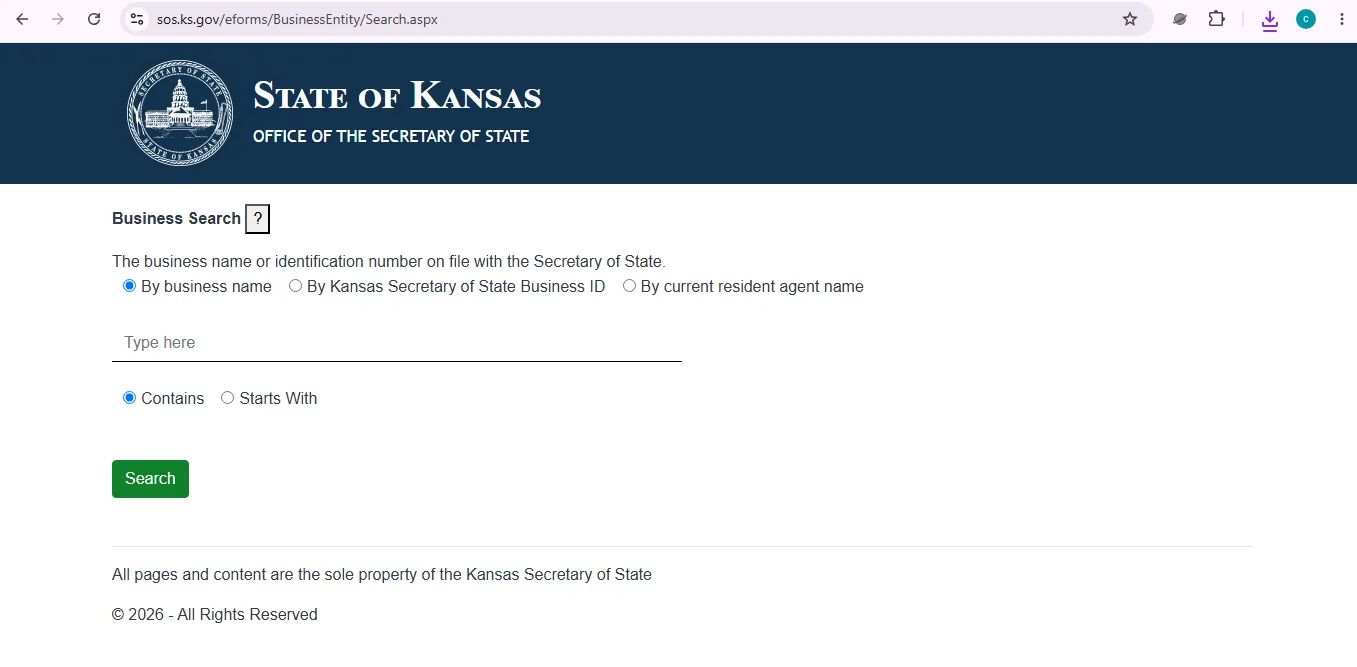
Image description: this user-help visual reference shows the official Kansas Secretary of State business entity search screen where users can begin a business name or business ID lookup. It is not a claim that this website is the official Kansas Secretary of State website.
Search the cleanest business name first
Try the exact legal name first. If results are weak, remove LLC, Inc, Corp, Corporation, Company, punctuation, apostrophes and extra location words.
Open the selected record
Do not rely only on a result line. Open the record to check business ID, status, entity type, resident agent, registered office and available filings.
Copy the business ID
The business ID is the safest identifier for returning to the same Kansas record, ordering certified documents or filing information reports.
Check status and resident agent
A registered legal entity with a designated resident agent is important for contracts, notices and service. Do not assume the address is a storefront.
View file-stamped documents when available
Kansas says business-filed documents can be viewed and printed online without cost. Tax documents are not available through the Secretary of State database.
Purchase proof only when needed
If a bank, lender, agency, vendor or contract asks for official proof, use certified copies or Certificate of Good Standing after confirming the exact record.
How to Read a Kansas Business Record Without Misunderstanding It
A KSSOS record is useful, but it does not prove every business fact. Read each field with the right meaning.
Business name
Compare exact spelling, punctuation, suffix and similar names. A similar business name may belong to a different entity.
Business ID
Save the business ID. It is the cleanest way to locate the exact record for future searches, reports and certificates.
Entity type
Corporation, LLC, limited partnership, LLP, general partnership statement and foreign entity records mean different things.
Status
Status can help you understand whether the entity appears active, forfeited, dissolved, withdrawn, cancelled or otherwise changed.
Resident agent
The resident agent receives official notices and service of process. Agent information should be kept updated after registration.
Filed documents
Available documents can help verify formation, amendments, mergers, dissolutions, withdrawals and information report history.
Kansas Business Name Availability Before You Register
Name search is a screening step. It is not the same as legal advice, trademark clearance, licensing approval or tax registration.
Good screening method
- Search the exact name first.
- Search the strongest unique words only.
- Try singular, plural and abbreviation versions.
- Remove LLC, Inc, Corp, Company and punctuation.
- Search similar names before spending money on branding.
Do not rely on these alone
- Domain name availability.
- Social media username availability.
- Google search results.
- Only capitalization differences.
- A third-party “business search” page.
Kansas Information Reports Biennial Filing Rule
Kansas information reports are an important compliance step after registration. Do not confuse them with one-time formation filings.
| Report item | Details | Best for | Action / Note |
|---|---|---|---|
| Who files | Any business on file with the Kansas Secretary of State. | Ongoing registered entities. | Use the official File Information Report path. |
| Frequency | Every two years. | Businesses maintaining good standing. | Odd/even year depends on formation year. |
| Even-year businesses | Businesses formed in even years file in each succeeding even year. | Domestic or foreign entities formed in even years. | Check the exact entity record before filing. |
| Odd-year businesses | Businesses formed in odd years file in each succeeding odd year. | Domestic or foreign entities formed in odd years. | Save the filing confirmation after submission. |
| For-profit due date | April 15 of the respective odd or even year. | Corporations, LLCs and other for-profit filings. | Do not wait until the deadline week. |
| Not-for-profit due date | June 15 of the respective odd or even year. | Nonprofit entities. | Confirm status before filing. |
| Delinquency period | Three-month interval after the due date. | Late reports before forfeiture. | Documents may be limited once delinquent. |
| Forfeiture | After the delinquency interval, the business may forfeit and must file past due reports and reinstate before other filings. | Missed report situations. | Use reinstate path if forfeited. |
File-Stamped Copies, Certified Copies and Good Standing After Search
Kansas separates simple online viewing from official certified proof. Use the correct level of proof for your situation.
File-stamped copies
Kansas says documents filed by a business with the Secretary of State are available to view and print online without cost.
Copies helpCertified copies
A certified copy is purchased online and certified by the Secretary of State as a true and correct copy of the original on file.
Certified copiesCertificate of Good Standing
A Kansas Certificate of Good Standing shows the business name, good-standing status, formation document date and certification issue date.
Good standingKansas Business Entity Fees Cost-Safe Guidance
The public lookup path is separate from paid filings, certified copies and certificates. Final cost depends on the selected filing or document purchase screen.
| Task | Cost approach | Best for | Action / Note |
|---|---|---|---|
| Business search | Use official public search path | Looking up Kansas LLCs, corporations, LPs, LLPs and foreign entities. | Open search |
| File-stamped copies | View and print online without cost when available | Basic document review and non-certified proof. | Tax documents are not in the Secretary of State database. |
| Certified copies | Purchased online | When an agency, lender, contract or legal request needs certified proof. | Search by business name or business ID after logging in. |
| Certificate of Good Standing | Purchased online | Official good-standing proof. | Only available for a business in good standing. |
| Information report | Official report filing path | Biennial compliance filing. | Due date depends on for-profit/not-for-profit and odd/even year. |
| Registration and amendments | Use official form/online filing checkout | Formation, foreign registration, amendment, agent updates and close/reinstate filings. | Check the exact final total before payment. |
Common Kansas Business Search Problems and Fast Fixes
If you cannot find the record, change the search strategy before assuming the business is missing.
No result found
Remove LLC, Inc, Corp, Corporation, punctuation and extra words. Search only the strongest unique word group.
Too many results
Add one more unique word, city word, owner word or entity suffix. Then compare business ID, status and resident agent.
Wrong entity selected
Use the business ID before ordering certificates or certified copies. Similar names can create wrong proof orders.
Report missed
Check information report status. If the delinquency period has passed, the business may be forfeited and require reinstatement.
Tax document confusion
Kansas states tax documents are not available through the Secretary of State database and are not filed with that office.
Legal advice concern
KSSOS says the office is a filing agency and does not provide legal guidance. Ask an attorney or accountant when advice is needed.
Kansas Secretary of State Business Services Phone, Address and Map
Use these official contact details for business search, registration, information reports, certified copies and good standing help.
Business Services
Phone: 785-296-4564
Email: kssos@ks.gov
Hours: Monday to Friday, 8:00 a.m. to 5:00 p.m., excluding state holidays.
Office location
Docking State Office Building
915 SW Harrison Street
Topeka, KS 66612
Visitor note
KSSOS says metered visitor parking is available in front of the office and free two-hour parking is available nearby on Kansas Avenue.
Call first if your question can be solved online.
Official Kansas Business Entity Resources Use These After Reading
These are official Kansas Secretary of State or state business resources connected to entity lookup, registration, reports and certified documents.
Business Search
Main KSSOS lookup page for Kansas business entities and business ID searches.
Open searchBusinesses hub
Central KSSOS business page for search, registration, amendments, reports, reinstatement, closing and copies.
Open hubRegister a Business
Use for domestic Kansas entities, foreign registrations, LLCs, corporations, LPs, LLPs and related forms.
Register pageInformation Reports
Official guidance for biennial information reports, due dates, delinquency and forfeiture.
Report guideCopies & Certifications
Use for file-stamped copies, certified copies, Certificates of Good Standing and certificate verification.
Open copiesKansas Business One Stop
Helpful state portal for starting and maintaining a Kansas business beyond Secretary of State filing records.
Open One StopKansas Business Entity Search FAQ
Is the Kansas business entity search free?
You can use the official KSSOS Business Search path to look up Kansas business records. Fees apply when you file documents, purchase certified copies or order Certificates of Good Standing.
Where do I search for a Kansas LLC or corporation?
Use the official Kansas Secretary of State Business Search page. It is linked from the KSSOS Businesses section.
What business records does Kansas SOS maintain?
Kansas Business Services maintains records for corporations, LLCs, limited partnerships, LLPs and related documents such as mergers, dissolutions, cancellations, withdrawals and information reports.
Do all Kansas businesses register with the Secretary of State?
Corporations, LLCs, LLPs, LPs and other entities formed under Kansas business laws must register. Sole proprietors do not register with the Kansas Secretary of State, and general partnerships are not required to register but may file a Statement of Partnership Authority.
Can I search Kansas by business ID?
Yes. Business ID is the best exact-match detail to use for returning to the correct record, ordering certified proof and filing related documents.
Are Kansas file-stamped business documents free to print?
Kansas says documents filed by a business with the Secretary of State are available to view and print online without cost. Tax documents are not included in the Secretary of State database.
How do I buy a Kansas certified copy or Certificate of Good Standing?
Use the Copies and Certifications process. Login to your account, search by business name or business ID, select the business and follow the onscreen instructions.
How often are Kansas information reports filed?
Kansas information reports are filed every two years. Businesses formed in even years file in succeeding even years, while businesses formed in odd years file in succeeding odd years.
When are Kansas information reports due?
For-profit business reports are due April 15 of the correct odd or even year. Not-for-profit business reports are due June 15 of the correct odd or even year.
Who do I contact for Kansas business search help?
Contact Kansas Secretary of State Business Services at 785-296-4564 or kssos@ks.gov. The office is located at 915 SW Harrison Street, Topeka, KS 66612.
Does a Kansas SOS record prove a business is licensed or trustworthy?
No. A KSSOS record mainly shows business filing information. For licensing, taxes, insurance, complaints or professional approvals, check the correct agency or professional adviser.
Final Practical Advice
For most users, the safest Kansas business entity search workflow is simple: use the official KSSOS Business Search, open the exact record, copy the business ID, check status and resident agent details, then use copies, certificates or information report filing only after confirming the correct business.
Best path: KSSOS Business Search → open exact entity record → save business ID → check status and resident agent → view file-stamped documents → purchase certified copy or Certificate of Good Standing only when required.
Editorial verification note: official Kansas Secretary of State Business Services resources checked on July 13, 2026. This guide is informational and does not provide legal, tax, licensing, fraud-investigation or business formation advice.